
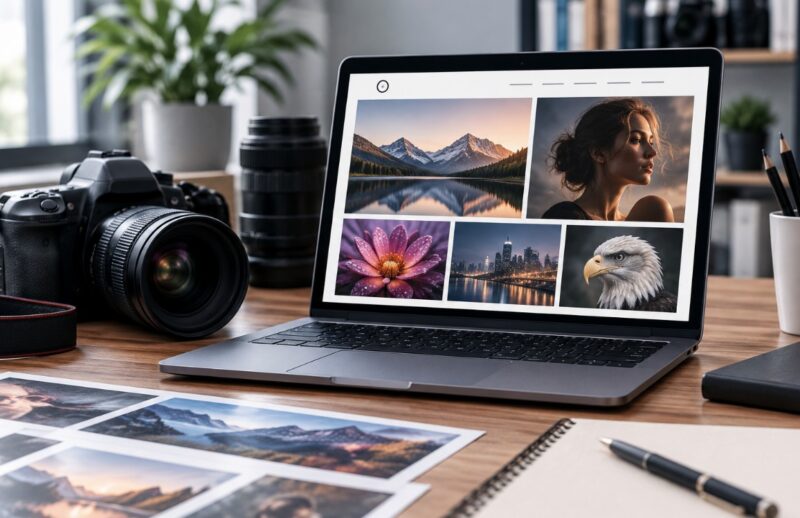
A beautiful portfolio can still fail if visitors cannot tell what you shoot, pages load slowly, or the contact button is buried. How many talented photographers lose inquiries because their website feels like an unedited archive? More than you might expect.
The 2025 Web Almanac found that the median homepage weighed 2.86 MB on desktop and 2.56 MB on mobile, with images contributing the largest share. For photographers, that statistic matters.
This guide explains how to build a successful photography portfolio online that looks polished, loads efficiently, ranks for relevant searches, and gives potential clients a clear reason to get in touch.
Here’s What’s Inside

A successful photography portfolio does four jobs: it shows your style, proves you can handle assignments, helps search engines understand your specialty, and makes hiring you feel easy. We will build those pieces in a practical order rather than beginning with fonts or animation.
You will learn how to:
- define a specific audience and goal;
- choose fewer, stronger images;
- write concise, credible copy;
- organize galleries, services, and contact pages;
- prepare web images for speed;
- use image SEO, alt text, and metadata naturally;
- add trust signals and maintain the site.
Here’s the thing: the best photography portfolio website is not necessarily the fanciest. It is the one that helps the right viewer quickly think, “This photographer fits my project.”
Start With One Clear Client and One Clear Goal
Before choosing a website builder, decide what the portfolio must achieve. A wedding photographer seeking couples needs a different structure from an architectural photographer pitching agencies or a fine-art photographer selling prints. Trying to speak to everyone creates vague headlines, mixed galleries, and weak search visibility.
Write one sentence that defines the site’s job: “I help independent hotels create warm editorial imagery,” or “I photograph relaxed outdoor weddings across Colorado.” Let it guide your homepage, galleries, service pages, and keywords.
Check three things:
- the work you want more of;
- the location or market you serve;
- the action visitors should take next.
The good news? You can still show range. Place your main specialty first, then use secondary galleries for related work instead of giving every subject equal weight.
Write Portfolio Copy That Sounds Human and Specific
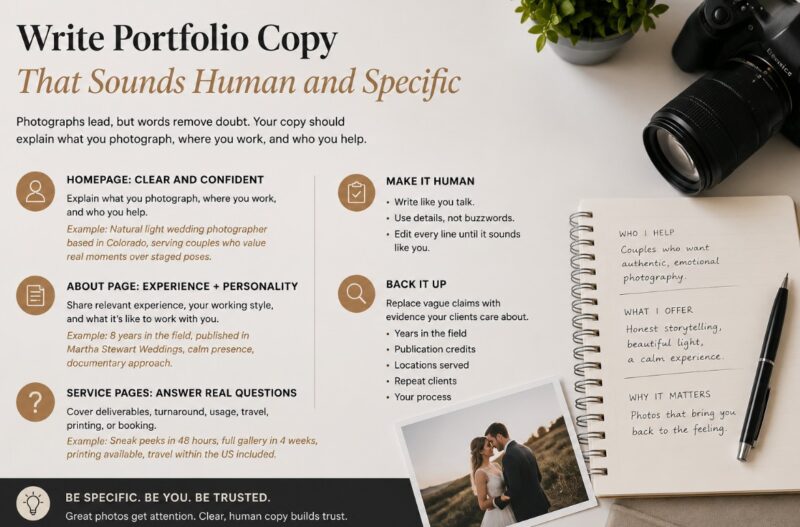
Photographs lead, but words remove doubt. Your homepage should explain what you photograph, where you work, and who you help. Your About page should add relevant experience, working style, and personality without becoming a life story. Service pages can answer practical questions about deliverables, turnaround, usage, travel, printing, or booking.
If generative tools help draft captions or page copy, edit every line until it sounds like something you would genuinely say. An AI detector can serve as an additional review step, but never treat one score as proof of authorship. Research shows automated detectors can perform poorly in some real-world settings, so judgment still matters most.
Replace vague claims with evidence: years in the field, publication credits, locations served, repeat clients, or a concise explanation of your process.
Curate the Work Like an Editor, Not an Archivist
A portfolio is not a storage drive. It is a controlled sequence of evidence. Start with your strongest image, finish with another memorable frame, and remove photographs that repeat the same composition, lighting idea, or emotional note. A focused set of 20 excellent images often communicates more confidence than 80 uneven ones.
Look for variety within consistency. A portrait gallery might include close-ups, environmental portraits, movement, group interaction, and different lighting while still feeling recognizably yours.
Use this editing test:
- Is the subject immediately clear?
- Does the image add something new?
- Is the technical quality strong?
- Would you welcome a similar commission?
- Does it fit beside nearby photographs?
When two images do the same job, keep the stronger one. Restraint makes good work look more valuable and memorable.
Build a Simple Structure That Guides the Viewer
Visitors should never wonder where to click next. Keep the main navigation short and use labels people understand. “Weddings,” “Commercial,” “Prints,” and “Contact” are easier to scan than clever category names.
| Page | Main purpose | What to include |
| Home | Establish fit | Specialty, location, best work, call to action |
| Portfolio | Prove ability | Focused galleries |
| Services | Explain the offer | Process, deliverables, pricing guidance |
| About | Build confidence | Experience, approach, portrait |
| Contact | Start a conversation | Short form, email, location |
Keep each gallery one or two clicks from the homepage. Then ask what visitors should do after every page. A small “View the full gallery” or “Discuss your project” link is usually enough. Avoid pop-ups that interrupt the photographs before trust has formed.
Prepare Images for Speed Without Sacrificing Impact
A photography website needs detail, but it does not need full-resolution print files. Export web versions at the largest dimensions your layout displays, compress them carefully, and use responsive sizes so phones do not download desktop assets. WebP or AVIF can reduce transfer size, while JPEG remains useful when workflow compatibility matters. Google recommends choosing formats and compression according to each image’s role.
Working rule: Export web previews in sRGB and keep high-resolution print masters as separate assets. Your portfolio should display beautifully, not distribute production files.
Test the homepage on mobile data, not only fast Wi-Fi. Set image width and height, lazy-load gallery images below the fold, and prioritize the hero photograph. Google considers an LCP within 2.5 seconds a good loading experience.

Use Image SEO to Describe the Work, Not Stuff Keywords
Search engines need context around photographs. Give each gallery a descriptive title, a short introduction, a clean URL, and captions where they help. Instead of “Gallery Two,” use language connected to real searches, such as “Austin Food Photography” or “Black-and-White Family Portraits.”
Write alt text for accessibility first. Describe what is useful about the image in that page’s context, and avoid repeating one keyword across every photograph. Google recommends useful, information-rich alt text and warns against keyword stuffing. W3C guidance distinguishes informative images from decorative ones, which may need empty alt attributes.
Readable filenames help organization, but filenames alone will not rank a gallery. Supporting copy, internal links, page relevance, and site quality work together. Retain appropriate IPTC creator, copyright, credit, and rights information in your workflow.
Add Proof, Simplify Contact, and Keep Improving
Show experience with short case studies explaining the brief, your role, constraints, and the result. Add accurate publication credits, permitted client names, testimonials with context, and a professional portrait. Make your location, service area, email, and response expectations easy to find.
Reduce contact friction. Ask only for information needed to qualify the project, such as date, location, intended use, budget range, and deliverables. Long forms discourage inquiries, especially on mobile.
After launch, check monthly for broken links, outdated galleries, missing alt text, slow pages, and failed forms. Review Search Console queries and analytics to see which services attract qualified visitors. Adobe recommends setting a regular update schedule and removing older or less relevant work as new projects are added.
Your portfolio should evolve as your strongest work and preferred clients change.
Build the Portfolio in Manageable Steps
A successful photography portfolio online is not created by uploading every good image and choosing a stylish theme. It comes from clear decisions: who the site serves, which photographs prove your value, how quickly pages load, and what visitors should do next. Start with two manageable actions. Edit one focused gallery, then rewrite the homepage headline so it states your specialty and location. Once those pieces work, improve image delivery, SEO, trust signals, and contact flow.
Keep reviewing the site as your work develops. A smaller, faster, more intentional portfolio will usually make a stronger impression than a complicated website visitors must figure out.
Frequently Asked Questions
Should I display prices on my portfolio?
Show starting prices or typical ranges when they help qualify leads. Custom commercial projects may still require tailored quotes.
Do I need a photography blog?
No, but useful project stories and location guides can support relevant searches, internal links, and evidence of recent work.
Should portfolio images be downloadable?
Usually not. Display optimized previews and use a separate protected gallery when delivering completed client files.
How often should I redesign?
Redesign when positioning or usability changes. Regularly updating images, copy, proof, and performance matters more than following every design trend.